Business License
Commercial, per machine
US$99.95/ license
- Perpetual license
- One year of free updates
- Email and ticket support
LanSend is a LAN messenger for Windows that sends pop-up messages to one or many PCs over the local network. There is no server to run and nothing to install on the machines you message.
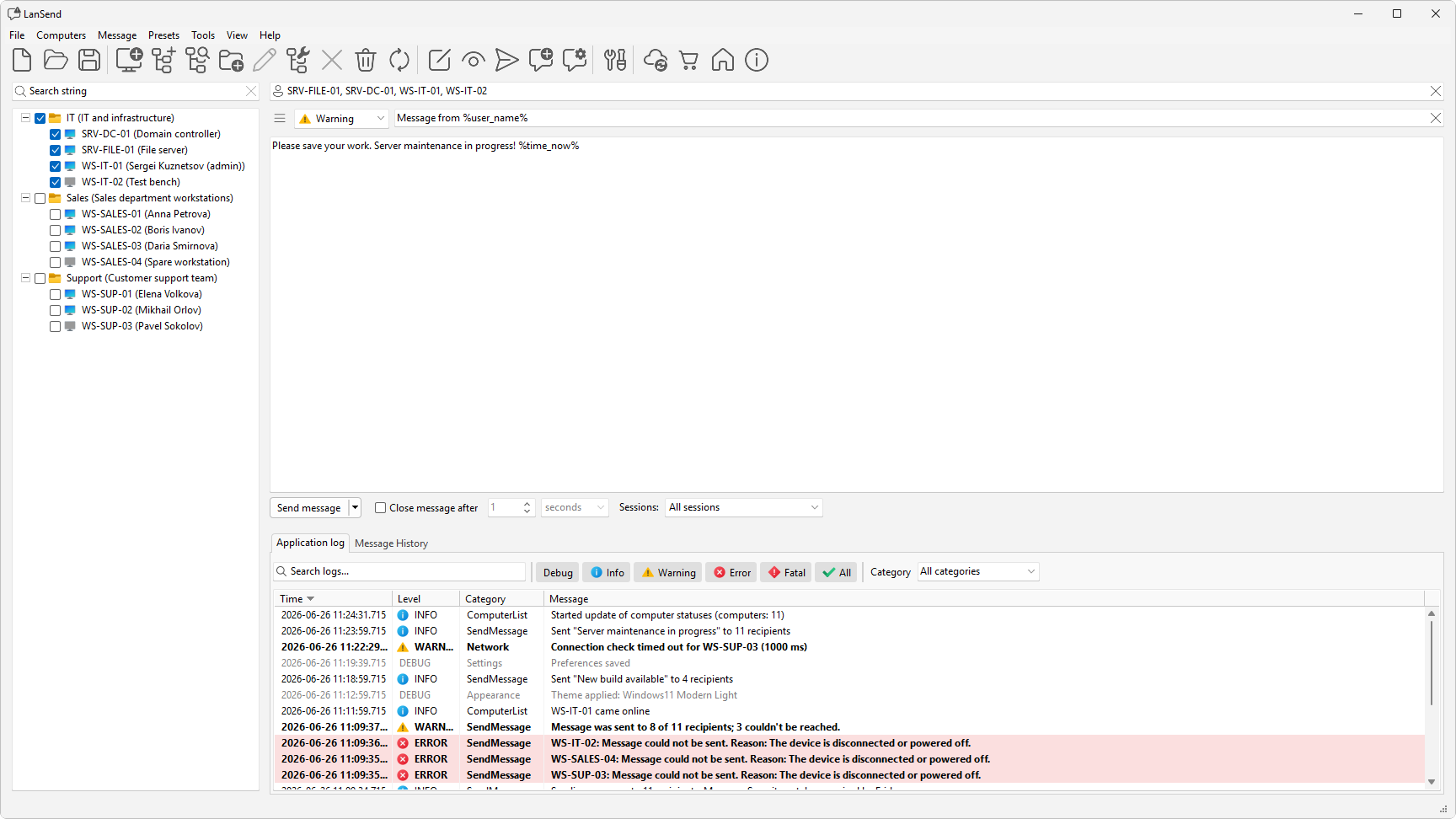
LanSend sends pop-up messages to remote computers on your local network, replacing the old net send command and msg.exe. It is easy to use and needs no Internet access, no dedicated server, and nothing installed on the recipient's machine.
Prefer the command line? You can install LanSend with winget: winget install lansend.
Send a pop-up to one computer or every PC at once, choose which sessions see it, build your computer list, and reuse saved presets. No server, and nothing to install on the machines you message.
Message any Windows PC on your LAN with no server to run and nothing to install on the other end.
Pick one machine, a group, or every PC on the list, then send one pop-up to all of them.
Reach whoever is actively working, everyone signed in, or just the console session.
Add machines by hand, from a name pattern, or from Active Directory, an IP range, and more.
Replace the removed net send command and the command-line msg.exe with a tool that has a window.
+5 more See all featuresSee the everyday workflow up close: build a computer list, send a pop-up to one machine or a whole group, save messages as presets, and follow your Windows light or dark theme.
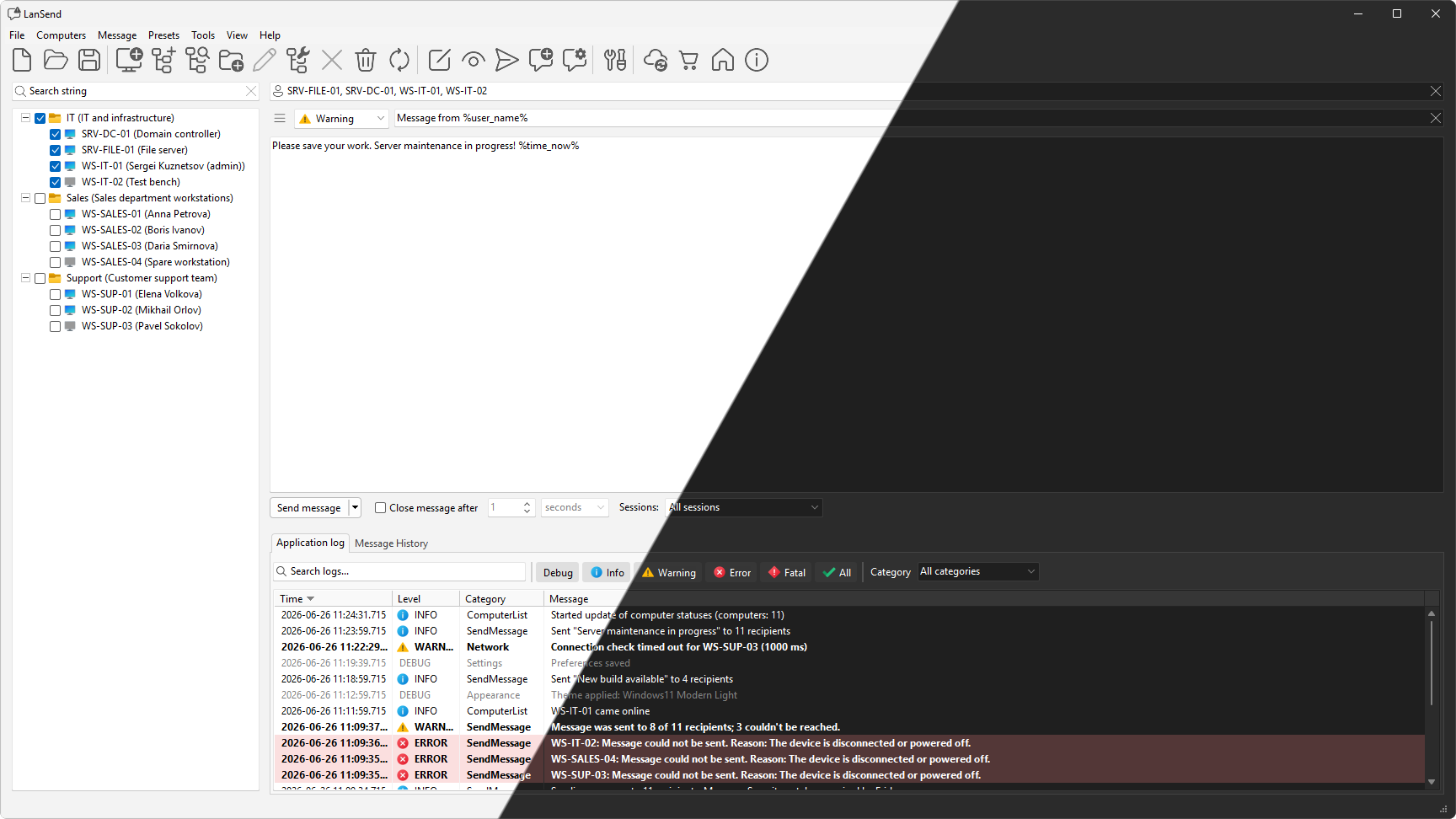
Keep your common notices, such as a maintenance window or a shutdown warning, as presets. Load one from the Presets menu, adjust the wording, and send. LanSend ships a set of ready-made presets for maintenance and updates, emergencies, service notifications, and testing, grouped into categories.
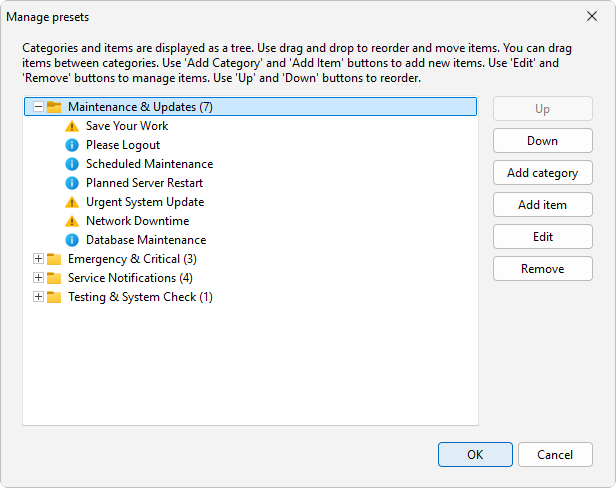
The Message History tab keeps a record of what you sent, to whom, and when, and you can reuse any past message or save it as a preset. The Application log records what the program does. Both are searchable and filterable, so you can find an entry in a long list quickly.
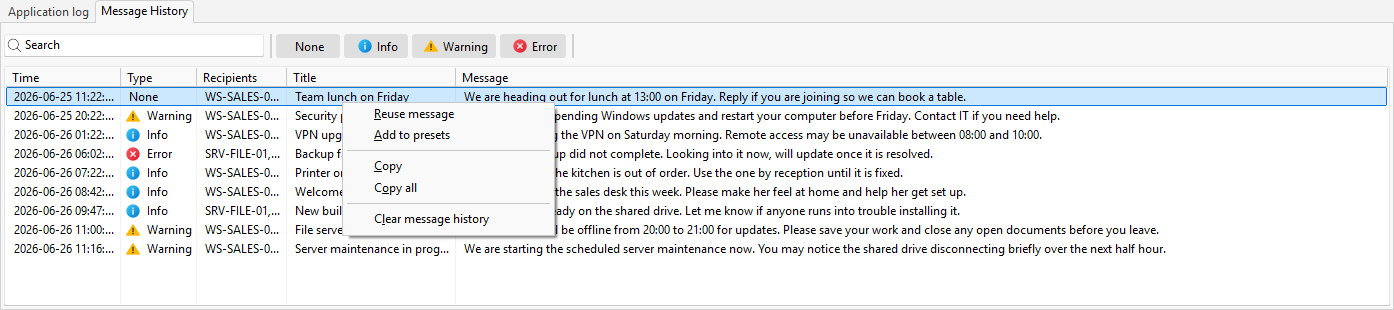
Choose a light or dark theme, or let LanSend follow your Windows setting and switch with it. Toolbar and menu icons are vector graphics, so they stay crisp on high-resolution displays at any scale.
Released Aug 30, 2026. The main changes in the most recent release. See every version on the Releases tab.
Full release notesLanSend is a native 64-bit app for Windows 11 and 10, and Windows Server 2025 through 2016. You need network access to the computers you message, plus administrative rights on them or the message permission an admin can grant to a standard user.
Two licenses to choose from: Business covers a set number of machines, and Corporate covers an entire organization. One purchase, no subscription.
Commercial, per machine
Whole organization
Quick answers about what LanSend needs to run, the Windows versions it supports, how it reaches recipients, and how it compares to net send and msg.exe.
The latest version of LanSend supports the following Windows platforms: Windows 10, Windows Server 2016, Windows Server 2019, Windows Server 2022, Windows 11, Windows Server 2025 .
No, LanSend is a paid product. It has two license tiers: a Business license, sold per machine for commercial use, and a Corporate license that covers a whole organization. See LanSend pricing for the current prices.
The Business license is per machine: count the computers that will run LanSend and buy one license for each. The Corporate license is a single license for a whole organization, with unlimited installations across departments and sites, plus priority support. Pick Business for a fixed, smaller set of machines, and Corporate once you have many computers or several sites. Both are perpetual and include a year of updates and support. See LanSend pricing.
No. LanSend uses the Windows messaging channel built into the operating system, so the recipient PCs need nothing installed and there is no server in the middle. You run LanSend on one machine and it messages the others directly. You do need network access to each target PC and administrative rights on it.
net send was removed after Windows XP and Server 2003, so it does not exist on modern Windows. msg.exe still works but is command-line only, sends to one host per call, and has no saved computer list, no presets, and no history. LanSend uses the same Windows delivery channel and adds a window, a computer list with groups, presets, and a message log.
Yes. Add the machines to the computer list, check the ones you want (or use Computers > Check all), and click Send message. You can reach a single PC, a group such as a floor or a lab, or every computer on the list in one send.
Other Windows tools for the same admins: manage Remote Desktop sessions, watch remote processes, and audit RDS activity.
 Terminal Services Manager
Monitor & Manage RDS / RDP Sessions
 Remote Process Explorer
Powerful tool for managing, monitoring and analyzing processes on a local or remote computer.
 Remote Desktop Audit
Monitoring and analyzing Remote Desktop Services logs.