
A terminal server that works after a reboot and then, some time later, stops accepting connections is a bad kind of failure. Nothing crashes outright. Users sit on "Connecting", and by the time the first ticket arrives the server is already stuck.
Many administrators have seen exactly this since the security updates of September 8, 2026. Microsoft has confirmed the problem and released fixes, but you have to check yourself whether your servers have them.
What happens
Microsoft lists these symptoms:
- RDP connections fail or stay at "Connecting"
- sign-in fails or stays at "Welcome"
- the server stays at "Please wait for the Remote Desktop Configuration"
- RDS becomes unstable or stops responding
- MMC, the RDS Licensing Diagnoser or File Explorer stops responding
- the Windows Update page stops responding and keeps showing a loading indicator
Microsoft's release health entry adds that RDP connections can fail "after several minutes".
Administrators in forums describe the same pattern. The host runs normally for a while, then new connections hang, and sessions that are already open can't log off cleanly. Timing varies a lot in the r/sysadmin thread: some hosts lock up half an hour after a restart, others run for days. Busy hosts fail more often, though one reader has a host with about ten users a day that never did. None of this is confirmed by Microsoft.
Microsoft has not published technical details of the cause. A Reddit analysis quoted by LazyAdmin points at a thread that waits forever during session teardown and blocks every other session change. Treat it as an outside explanation until Microsoft says more.
Who is affected
Microsoft's table of affected updates covers Windows Server 2025, 2022, 2019, 2016, 2012 R2 and 2012, plus Windows 10 and Windows 11. Microsoft says Windows 365 and Azure Virtual Desktop are not affected.
Microsoft's checklist of endpoints to update includes servers that use RDP only for administration. In the forum threads, one administrator says such servers do hang, a few report the same on Windows 11, while another patched 23 Server 2019 machines without the RDS role and saw nothing. If you only use RDP for administration, don't assume you are safe.
The fix
Microsoft released out-of-band updates on September 14, 2026, and says the correction is also in every cumulative update released after that date. These are the numbers from Microsoft's table:
| System | September update | Fix |
|---|---|---|
| Windows Server 2025 | KB5122871 | KB5129235 |
| Windows Server 2022 | KB5122882 | KB5129237 |
| Windows Server 2019 | KB5122876 | KB5129238 |
| Windows Server 2016 | KB5123099 | KB5129239 |
| Windows Server 2012 R2 | KB5123066 | KB5129243 |
| Windows Server 2012 | KB5123065 | KB5129244 |
Some early reports said Server 2016 got no out-of-band fix, but KB5129239 lists the RDS correction.
Microsoft's KB pages for the server out-of-band updates say they come only from the Microsoft Update Catalog, so Windows Update may never offer them. Server 2012 and 2012 R2 need the servicing stack prerequisites, and Windows may not offer the fix if one is missing. After the restart, check the OS build as well as the list of installed updates.
If you can't install the fix right away, Microsoft published Known Issue Rollback Group Policy packages as a temporary mitigation. As Microsoft's Known Issue Rollback guide explains, the policy has to be set to Disabled, which trips up a lot of people. The rollback only bridges the gap until you can install the fix, and it doesn't help everyone: some administrators in the Reddit thread report hosts that still hung after applying it, with scripts stuck and logoffs never finishing. Watch the two events below for a day or two after you set it.
Uninstalling the September update also works, but it removes that month's security fixes too, so keep it for when nothing else does. The update arrives bundled with a servicing stack update, so wusa /uninstall fails. List the packages with dism /online /get-packages and remove the cumulative update package by name. One administrator reports that DISM refused on a third VM with "Permanent package cannot be uninstalled".
The October 13 cumulative updates fall under Microsoft's wording "updates released after this date", although their own KB pages don't mention RDS. For Server 2012 R2, the Microsoft known issues page marks the issue resolved by KB5129243. The same page says Extended Security Updates for 2012 R2 ended on October 13, 2026. The October rollup, KB5126836, shipped that day, and no more updates are coming after it. Check that your 2012 R2 servers have one of the two.
Catching a hung host early
Community write-ups name two events that show up before users start calling:
- Event 20498 in the TerminalServices-RemoteConnectionManager log: "Remote Desktop Services has taken too long to complete the client connection"
- Event 6005 from Winlogon: "The winlogon notification subscriber SessionEnv is taking long time to handle the notification event (Disconnect)"
The same reports describe TermService stuck in STOP_PENDING. Several administrators say they got a host back without a reboot by killing the process that hosts TermService (find its PID with sc queryex TermService, then taskkill /f /pid <pid>) and starting the service again. On Azure, one administrator reached a stuck VM through the Serial Console. Microsoft does not list this as a workaround, it disconnects every active session, and others report that only a hard reset brought their host back.
Where Terminal Services Manager helps
One limit first. On a host that is truly deadlocked, nothing that talks to Remote Desktop Services gets an answer, and that includes Terminal Services Manager. It can't close a hung session on a frozen server. A restart, and then the fix, is the way out.
The tool earns its place before and after that.
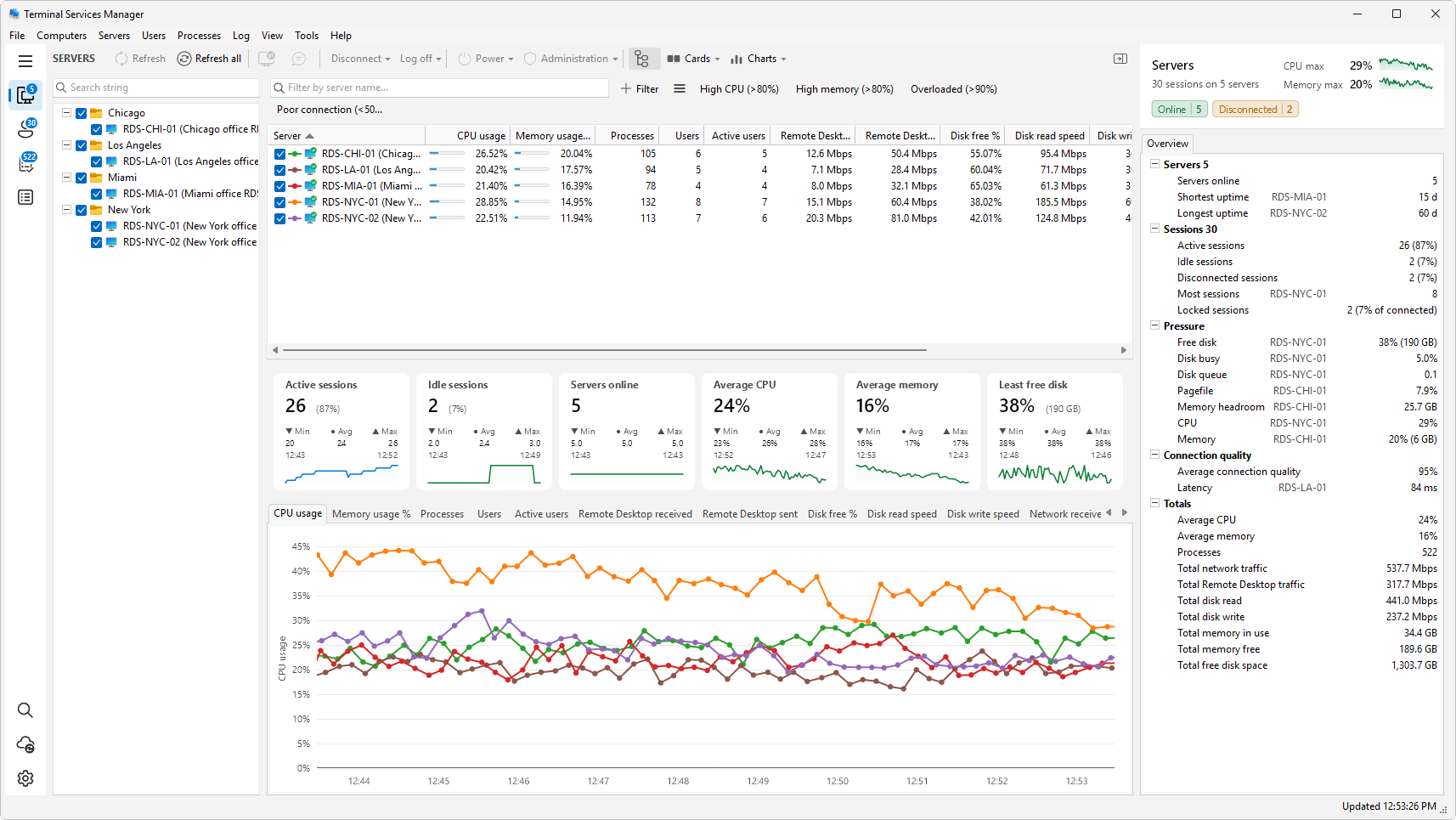
Before: seeing a server go quiet. The summary cards show how many servers are online and how many report errors, next to counts of idle, disconnected and locked sessions across everything you monitor. Set the levels where a card turns amber or red, and a host that stops answering shows up on one screen instead of in a call from a user. The routine in a five-minute morning check for your RDS servers builds on exactly that.
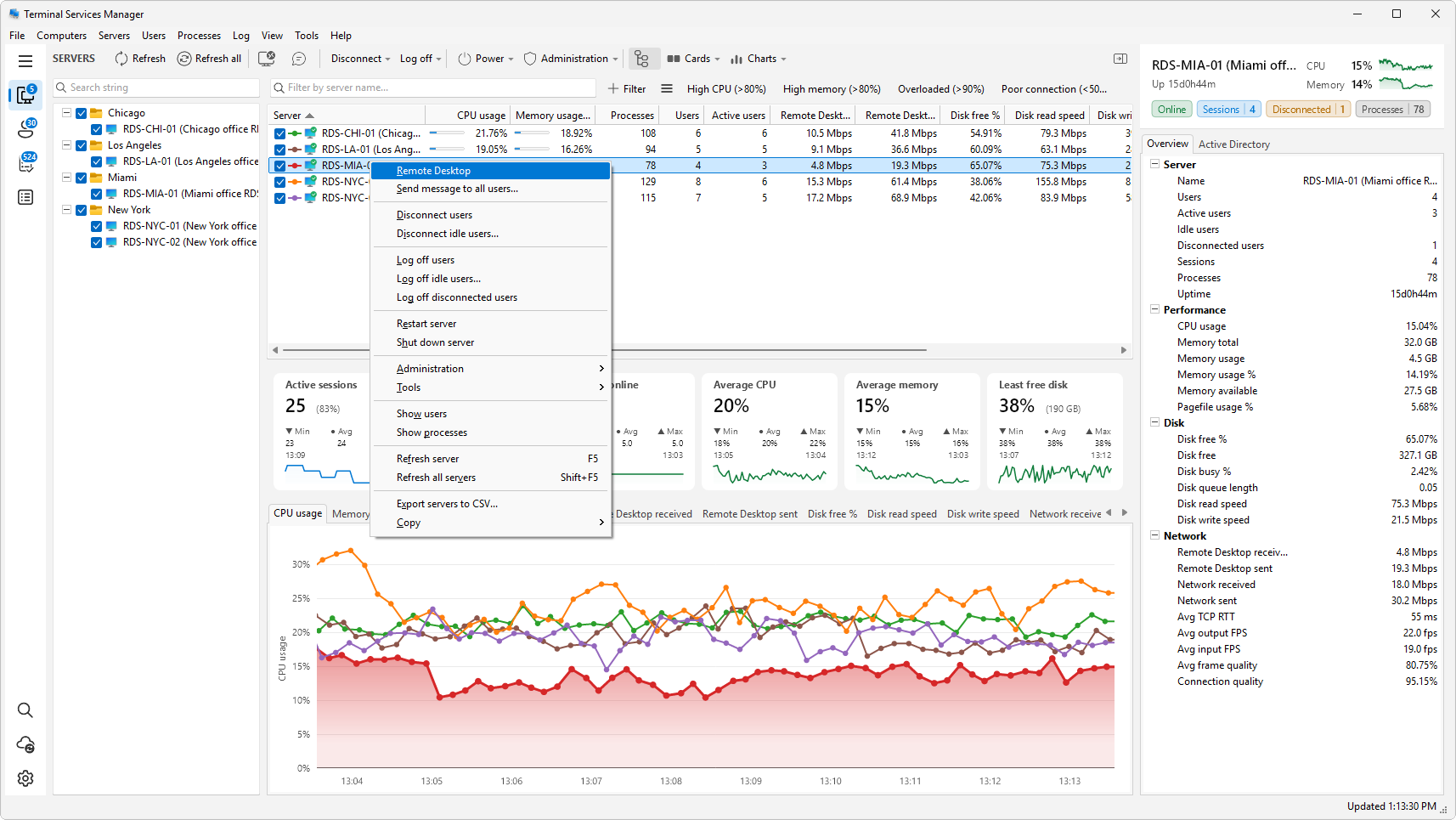
After: cleaning up. Once a host is back, old sessions are often left behind. The server menu logs off or disconnects every user, only the idle ones, or only the disconnected ones, and you can run it on several servers in a row. How to find locked RDP sessions and log them off walks through it.
Afterwards: checking what happened. Session history rebuilds logons, logoffs and disconnects from the Windows Event Log for any period you choose, so you can look at the days around September 8 and see when sessions started behaving differently.
If shadowing fails on a server after the September updates, rule this issue out first. Terminal Services Manager shadows through the standard mstsc /shadow command, so a hung RDS on the host takes shadowing down with it.
Get Terminal Services Manager to keep all your session hosts in one window.
Sources
- Microsoft Learn: Troubleshoot RDS instability after September 2026 Windows security updates
- Microsoft release health: Resolved issues in Windows Server 2025
- Microsoft release health: Windows Server 2012 R2 known issues and notifications
- Microsoft Learn: Use Group Policy to deploy a Known Issue Rollback
- Microsoft Update Catalog
- BleepingComputer: Microsoft: September updates cause RDS failures on Windows Server
- BleepingComputer: Microsoft releases emergency Windows updates to fix RDS failures
- LazyAdmin: September 2026 update breaks RDS (community reports, the event IDs and the Reddit analysis)
- WinTips: RDP and RDS stop working after the September 2026 Windows update (TermService STOP_PENDING and restart)
- Reddit r/sysadmin: Anyone seeing RDS session hosts hang after the September 2026 cumulative updates (administrators' reports: timing, TermService recovery, rollback problems)