
If you have gone looking for Terminal Services Manager on Windows Server 2012, 2016, 2019, 2022, or 2025 and could not find it, the snap-in is not hiding. It is gone.
The short answer
The tsadmin.msc snap-in shipped with Windows Server 2003 through Windows Server 2008 R2, where it was renamed Remote Desktop Services Manager along with the rest of Terminal Services. It is not part of Windows Server 2012 or any release after it.
Session management moved into Server Manager, under Remote Desktop Services, and into the command line.
What replaced it
| What tsadmin.msc did | How you do it now |
|---|---|
| List the sessions on a server | Server Manager > Remote Desktop Services > Collections, or the Users tab in Task Manager |
| See users, their state, and idle time | quser /server:HOST |
| See session IDs and names | query session /server:HOST (also qwinsta) |
| Disconnect a session | tsdiscon <id> /server:HOST |
| Log off a session | logoff <id> /server:HOST |
| Reset a hung session | reset session <id> /server:HOST (also rwinsta) |
| Send a message to a user | msg <user> /server:HOST |
| Shadow a session | mstsc /shadow:<id> /v:HOST |
On a full RDS deployment there is also the RemoteDesktop PowerShell module, where Get-RDUserSession lists sessions across the deployment and Invoke-RDUserLogoff ends one.
Windows Server 2016, 2019, 2022, and 2025
Nothing has come back. Every release since Windows Server 2012 follows the same model:
- Server Manager shows sessions for servers that belong to an RDS deployment, under Remote Desktop Services and Collections.
- The command-line tools (
quser,query session,tsdiscon,logoff,reset session,msg) ship with every release and work one host at a time. Get-RDUserSessionlists sessions across a deployment and is documented for Windows Server 2022 and Windows Server 2025. It talks to an RD Connection Broker, so a standalone RD Session Host is out of scope.
Upgrading from Windows Server 2019 to 2022 or 2025 does not bring the session view back. The gap tsadmin.msc left is the same in all of them.
What the replacements do not do
- Server Manager only knows about a deployment. Its Remote Desktop Services page covers servers that belong to an RDS deployment with a Connection Broker. A standalone RD Session Host never appears there.
- Task Manager only knows about one machine. Its Users tab shows the server you are signed in to, and nothing else.
- The command-line tools work one session at a time. Finding the right session across a farm means running
quseragainst each host in turn. - None of them show processes next to the user running them. When a session is slow, that is usually the first thing you want.
Managing sessions from Windows 10 or Windows 11
Most administrators do not sit at the server. They work from a workstation, so the next question is what you can see from Windows 10 or Windows 11.
tsadmin.msc was never part of client Windows, and RSAT does not bring it back. The Remote Desktop Services Tools feature in RSAT is 3.6 MB and holds three snap-ins: Remote Desktop Licensing Manager, Remote Desktop Licensing Diagnostics, and Remote Desktop Gateway Manager. None of them lists user sessions.
# RSAT Remote Desktop Services Tools (Windows 10 1809 or later, and Windows 11)
Add-WindowsCapability -Online -Name Rsat.RemoteDesktop.Services.Tools~~~~0.0.1.0

# Server Manager is a separate capability
Add-WindowsCapability -Online -Name Rsat.ServerManager.Tools~~~~0.0.1.0
What does work from a workstation:
quser /server:HOSTlists users, session IDs, state, and idle time on one server.query session /server:HOST(orqwinsta /server:HOST) lists sessions, including the ones with nobody signed in.tsdiscon,logoff,reset session, andmsgall accept/server:HOSTand act on one session at a time.mstsc /shadow:<id> /v:HOSTstarts a shadow session.
These commands need administrative rights on the target server. When something goes wrong they tend to say very little, either access denied or an RPC failure when the server cannot be reached, which is why a failed quser is rarely self-explanatory. Task Manager will not help either. From a workstation its Users tab shows your own machine, not the server.
Can I copy tsadmin.msc from Windows Server 2008 R2?
Administrators do try this, and it sometimes starts. It is not supported, it depends on libraries that newer releases of Windows ship in different versions, and it tends to break the first time the operating system is updated. Treat it as a stopgap rather than a plan.
Getting the same view back
Terminal Services Manager from LizardSystems is a separate program, not the Microsoft snap-in. It shares the name because it does the job the snap-in used to do, and it does it across every server at once rather than one at a time.
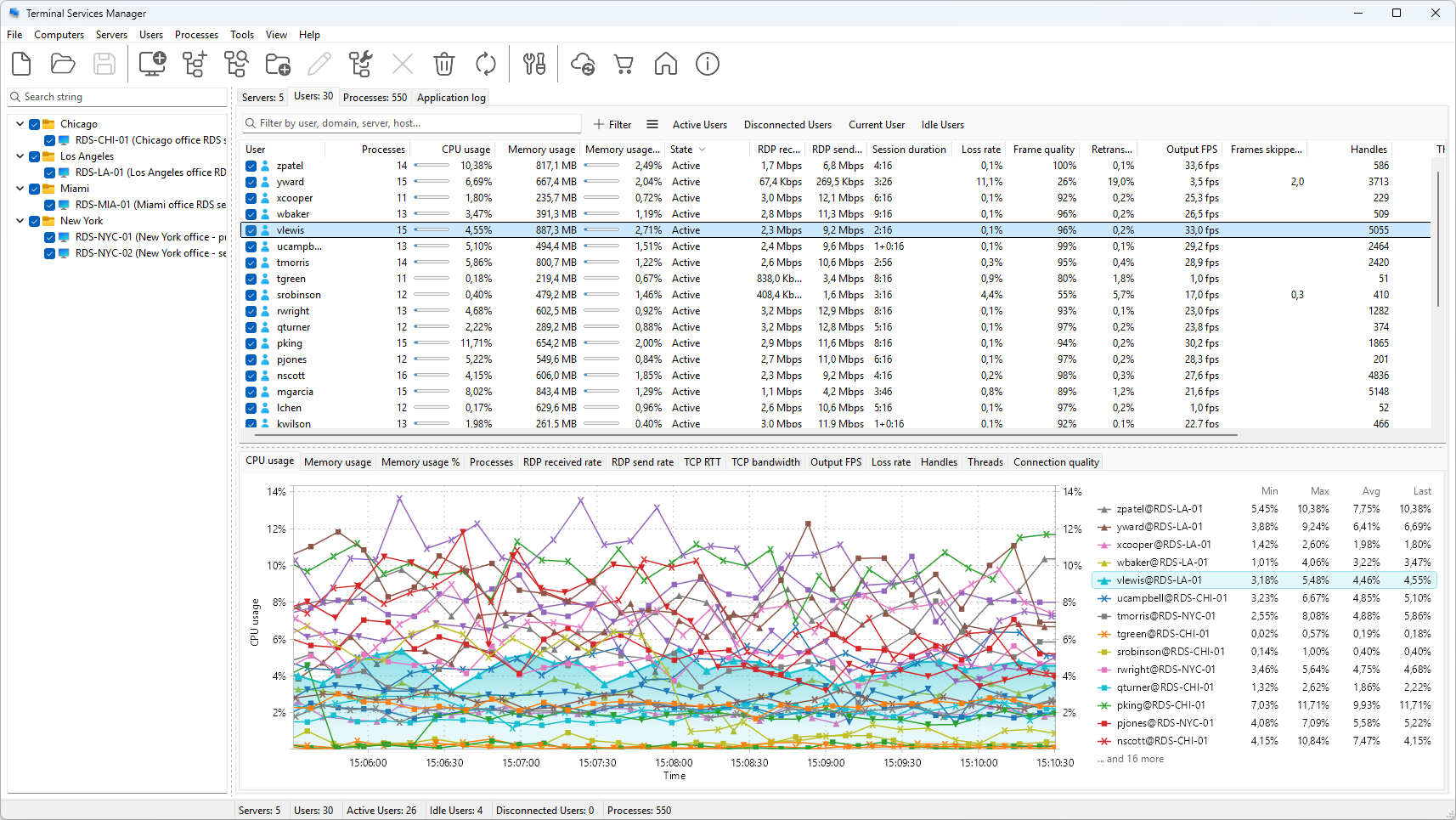
It lists every session with its state and idle time, shows the processes inside each session next to the user running them, and gives you the same actions from a right-click: disconnect, log off, reset, send a message, or shadow.
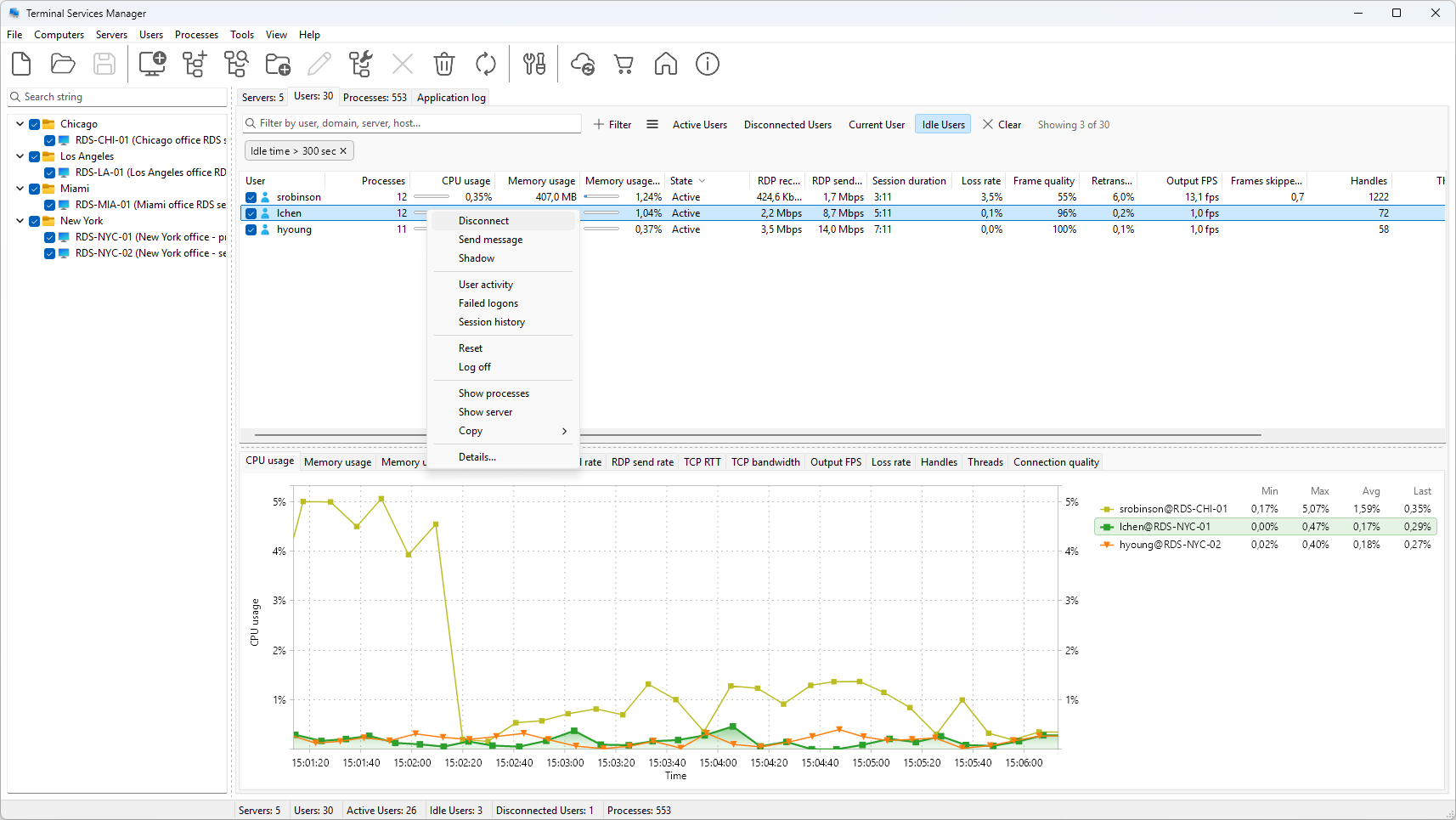
It talks to standalone RD Session Hosts as well as full deployments, and it installs nothing on the servers it manages.
FAQ
Is tsadmin.msc available in Windows Server 2016, 2019, 2022, or 2025?
No. It shipped through Windows Server 2008 R2 and has not returned in any release since. Later releases manage sessions from Server Manager or the command line.
Can I install Terminal Services Manager on Windows 11?
Not the Microsoft snap-in. It was never part of client Windows, and the RSAT Remote Desktop Services Tools feature contains only the Licensing Manager, Licensing Diagnostics, and Gateway Manager snap-ins.
Does RSAT include a session manager?
No. RSAT adds the licensing and gateway snap-ins. Session management stays in Server Manager and the command line.
What is the difference between Terminal Services Manager and Remote Desktop Services Manager?
They are the same snap-in. Microsoft renamed Terminal Services to Remote Desktop Services in Windows Server 2008 R2, and the tool was renamed with it.
How do I see who is logged on to a Remote Desktop server now?
Run quser /server:HOST. It lists each user with their session ID, state, and idle time. To see the users on many servers at once, see how to see who is logged on to a Remote Desktop server.
Does Server Manager show sessions on a standalone RD Session Host?
No. Only servers that are part of an RDS deployment appear under Remote Desktop Services.