
Customizing notification types in LanSend lets you tailor messages to communicate effectively with recipients. LanSend offers four message types - None, Info, Warning, and Error - which help you convey the urgency or nature of your message.
Steps to Customize Notification Types
-
Start LanSend: Begin composing a message in LanSend's main interface.
-
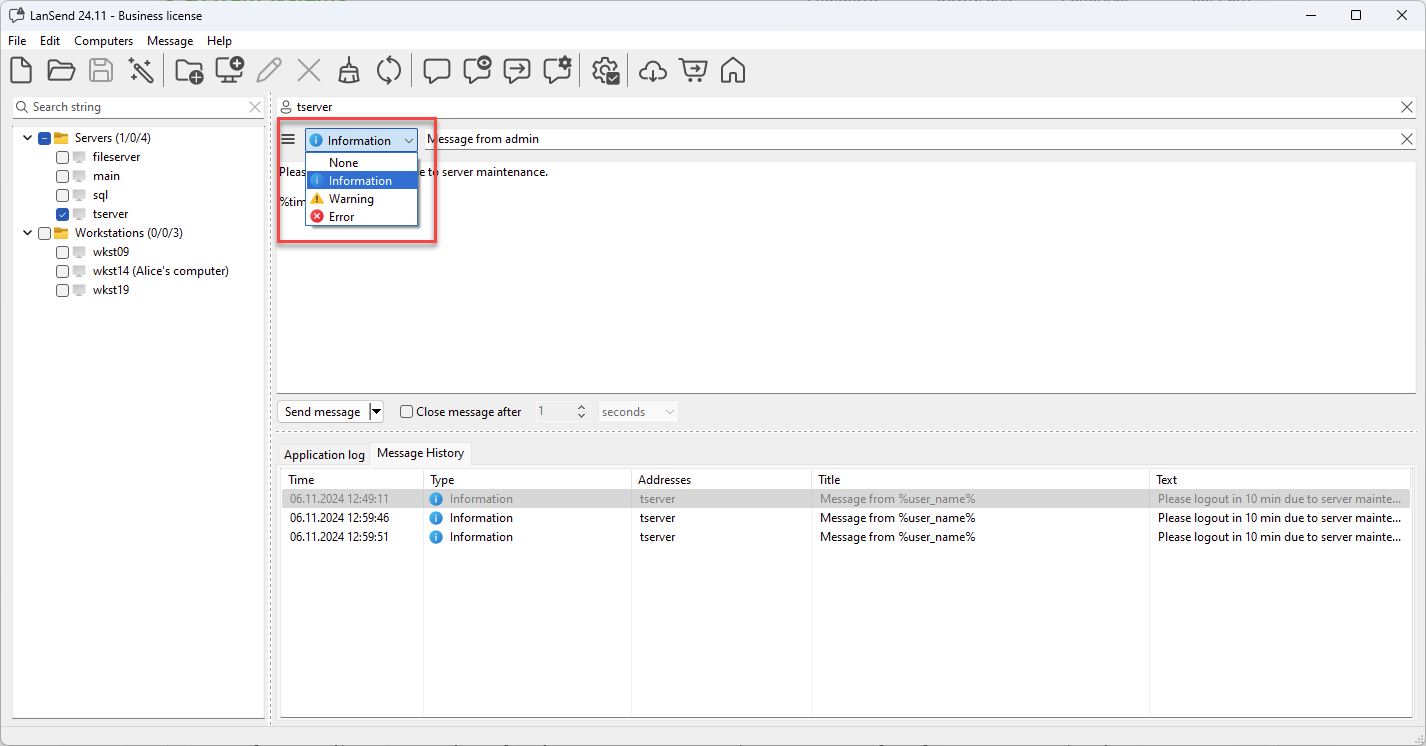
Select the message type: From the message type combo, choose the type that fits. Info, Warning, and Error each carry the matching Windows icon and sound, so messages are instantly recognizable; None is a plain message with no icon or sound. For example:
- None: For a plain notice with no icon or sound.
- Info: For general updates or non-urgent messages.
- Warning: To alert users of potential issues that need attention.
- Error: For critical alerts or system errors requiring immediate action.
-
Compose and Preview: After selecting the type, compose your message. You can use Preview message to see how it will look on the recipient's screen. This is helpful for confirming that your notification type aligns with the intended tone.
-
Send or Save as Preset: Send the message immediately, or save it as a preset for future use, ensuring consistent communication.
Best Practices for Using Notification Types
- Use Info messages for routine announcements to avoid alarming users.
- Apply Warning for actions that require user attention, like scheduled maintenance.
- Reserve Error notifications for severe issues to emphasize urgency.
Customizing notification types enhances clarity, making sure your audience understands the importance of each message at a glance. This feature is especially useful in environments with frequent or varied communication needs.