
Using variables in LanSend messages lets you personalize and automate your communication. Variables expand to your own machine's values just before the message is sent, so you can drop in the computer name, user name, or the current time without typing them by hand. They are not case sensitive.
Steps to Use Variables in LanSend
-
Compose the message: In the message editor, type your standard message text.
-
Insert variables: Use any of the five built-in variables, which resolve to the sender's (your) values at the moment of sending:
- %computer_name%: Your computer's name.
- %user_name%: Your user name.
- %time_now%: The current date and time when the message is sent.
- %time%: The current time.
- %date%: The current date.
-
Preview the message: Use Preview message to see how the variables resolve, ensuring accuracy and clarity.
-
Send or save as preset: Send the personalized message immediately, or save it as a preset to reuse the same format later.
Example Message with Variables
For a maintenance notice, you might write:
"Message from %user_name% (%computer_name%), sent at %time_now%. Scheduled maintenance begins at 18:00, please save your work."
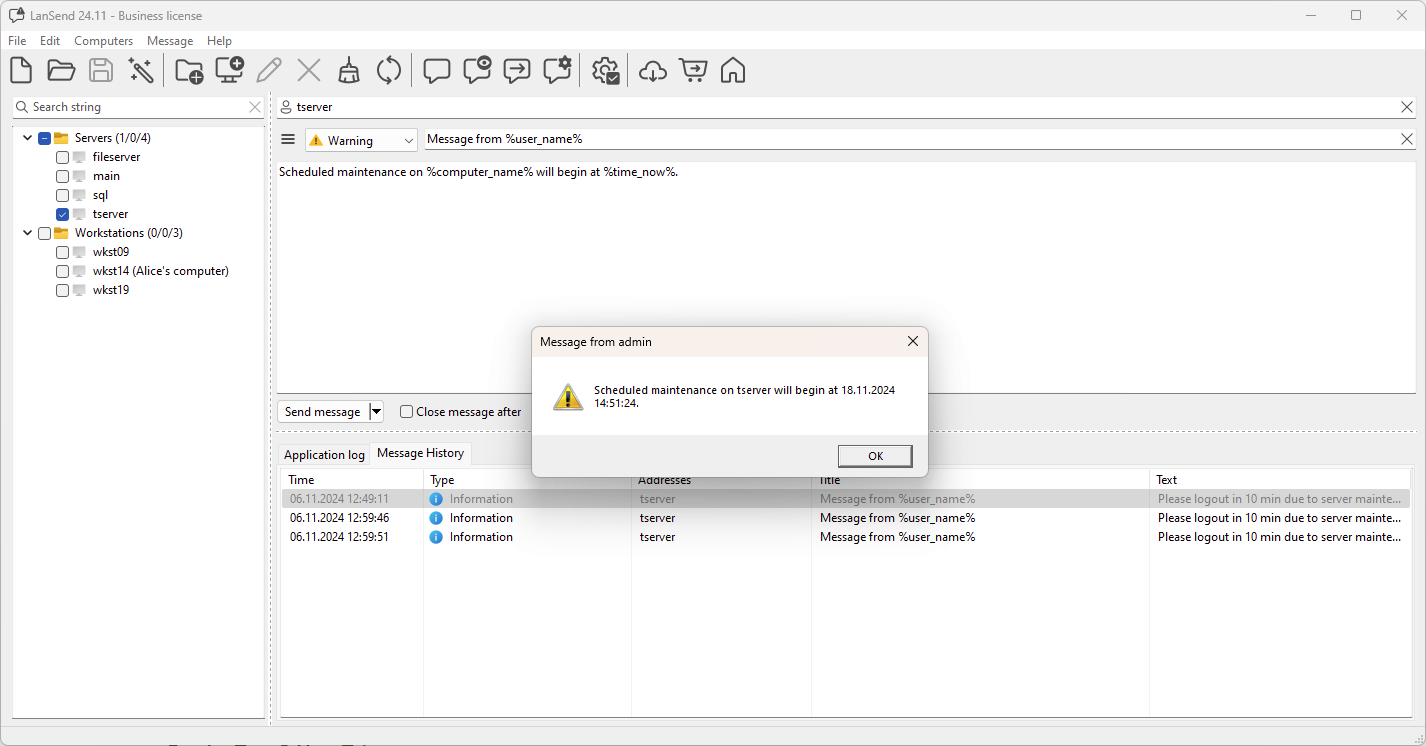
Because every variable resolves to the sender's values, %computer_name% is your machine, not the recipient's, and %time_now% is when you send the message, not the scheduled event time. Type fixed times such as the maintenance start directly into the text.
This flexibility improves communication efficiency and reduces repetitive manual input, especially useful for system administrators handling large networks.