
A server restarts in fifteen minutes, or a maintenance window starts after hours and you want people to save their work first. You need one clear warning on the right screens, with the time and the reason spelled out, so nobody loses unsaved files.
The manual way: msg.exe
net send was removed after Windows XP and Server 2003, so it is gone from every supported version of Windows. The built-in replacement is msg.exe. It sends a message to the terminal-services sessions on a single host:
msg * /server:PC1 Reboot in 15 minutes. Please save your work and close your files.
That * covers all sessions on PC1, but only on PC1. To warn the whole network you call msg.exe once per host, usually in a loop over a list. It has no window to type in, no saved wording to reuse, no message types, and no way to drop in the current time.
The faster way: LanSend
LanSend sends a warning to every checked computer at once, and it starts from wording you already keep on hand. It uses the same Windows messaging channel as msg.exe, so you need network reach to each target and administrative rights on it by default — configurable via Terminal Services permissions (see Enable Message Sending for Standard Users).
- Load a maintenance preset. Open the Presets menu or click the presets button (the menu icon next to the message body) and pick one from Maintenance & Updates, for example Scheduled Maintenance or Planned Server Restart. It fills the title, body, and type for you.
- Edit the wording. Adjust the body to match this event. Type the maintenance start time into the message yourself; the default presets use placeholders like [time] or [start time] that you replace. The
%time_now%variable is separate: it inserts the sender's current date and time at the moment of sending, a sent-at timestamp, not the restart time. - Set the type to Warning. In the message type combo choose Warning. It carries the matching Windows icon and sound, which marks the pop-up as something to act on.
- Set an auto-close timeout (optional). Tick Close message after, then set a value from 1 to 60 and a unit of seconds, minutes, or hours. Leave it unticked and the pop-up stays until the user clicks OK.
- Pick the recipients. Check the machines in the computer list, or click Check all for the whole list. Set the Sessions: dropdown to All sessions to reach everyone signed in to each machine.
- Send it. Click Send message. The same warning appears on every checked computer.
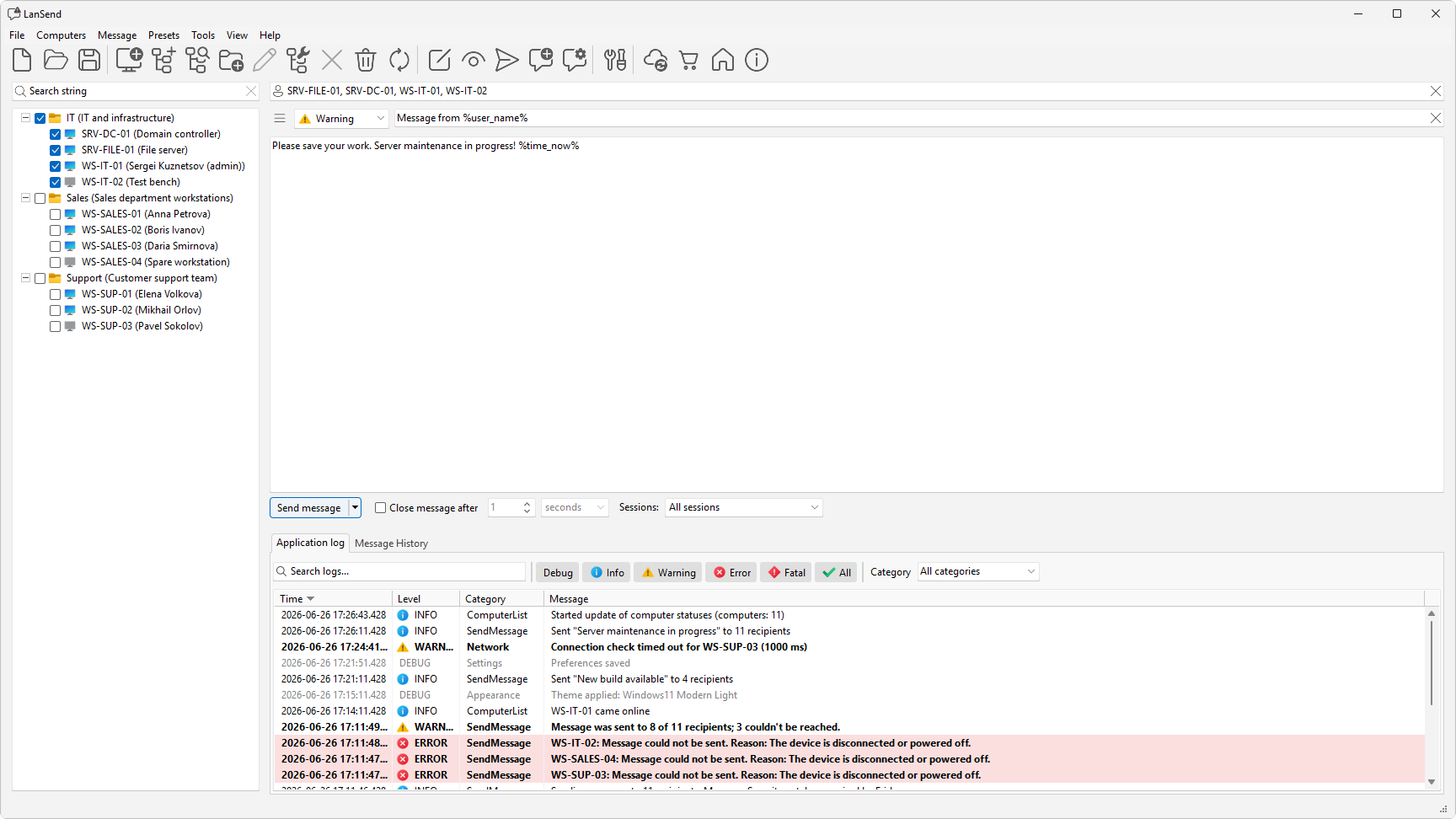
Want to check it first? Click Preview message to show the pop-up on your own screen with the same type, title, and timeout before it goes out.
Keep the wording as a preset
A reboot warning is the same most times you send it, give or take the time. After you word it the way you like, choose Message > Add message to presets to save its name, title, body, and type into a category. Any %time_now% variable stays in the saved text and resolves fresh on every send as a sent-at timestamp, so next time you load it, update the start time, and send. See Message presets to manage categories and edit saved messages.
What a warning does, and does not do
A LanSend warning notifies people so they can save and step away. It does not restart, lock, or log anyone off, and it cannot force an action.