
Message presets
A preset is a saved message: a name, a title, a body, and a message type, kept in a category so you can find it quickly. Presets turn the messages you send often, such as a maintenance notice or an emergency alert, into a one-click starting point.
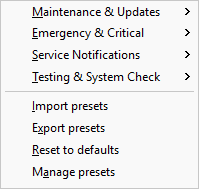
Open the Presets menu, or the presets button (the menu icon next to the message body), to load one by category. LanSend ships a default set you can use straight away, and you can save any message you compose with Message > Add message to presets. For a worked example, see warn users before a reboot or maintenance.
This part covers using presets to load and send one, the Presets menu and its import, export, and reset commands, how to manage presets and categories, and the default preset categories LanSend ships with.