
General
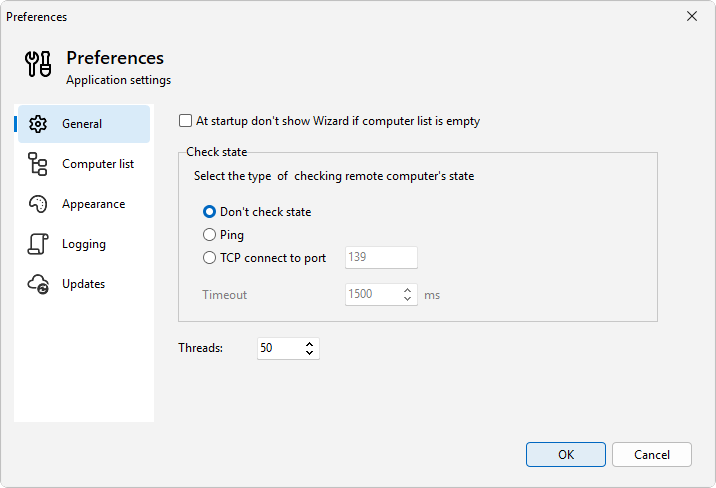
The General page holds the startup behavior and the settings that control how LanSend checks whether a computer is online. Open it from File > Preferences..., then pick General in the list of pages.
Startup
The checkbox At startup don't show Wizard if computer list is empty controls whether the Add computers wizard opens at startup when your computer list is empty.
Check state
This group decides how LanSend tests whether each computer is reachable. Pick one of the three radios:
- Don't check state turns the status check off. No computer is probed and the list shows no online or offline marks.
- Ping sends an ICMP echo to each computer.
- TCP connect to port opens a connection to the port in the field next to it. The default port is 139.
The result sets each computer's online or offline state in the list. How that state shows, and whether offline computers sort last, is on the Computer list preferences page. For more on what these marks mean and when LanSend refreshes them, see Checking computer status.
Timeout
Timeout is how long, in milliseconds, LanSend waits for a single status check to answer before it counts that computer as offline. A short timeout finishes the scan faster but can mark a slow host offline. Raise it if computers on a busy or distant network show offline when they are up.
Threads
Threads sets how many computers LanSend messages at once. A higher value works through a large list faster. A lower value puts less load on your machine and the network.