
Add a computer
Computers > Add computer puts one machine on the list. Use it when you want to add a single computer by name rather than pasting a batch or pulling them from a source.
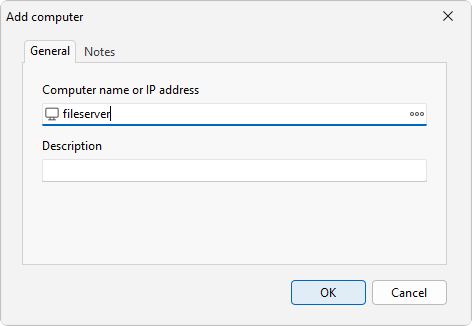
How to do it
- Open Computers > Add computer.
- In Computer name or IP address, type the machine's name or IP address, or click the browse button (...) to pick one.
- Add a Description if you want one. This field is optional.
- Use the Notes tab to keep any longer notes with the entry.
- Confirm to add the machine to the list.
LanSend does not store per-computer credentials, so there is no Credentials tab. To message a machine you need network reachability to it plus administrative rights on it.
Edit or remove an entry
- Computers > Edit changes the selected entry, so you can fix a name or update its description.
- Computers > Delete removes the selected entry.
- Computers > Delete all clears the whole list.
To add several machines at once instead of one at a time, use Add multiple computers. Once entries are on the list, you can sort them into Groups.
See also
Was this page helpful?
Thanks for your feedback.