
Checking for updates
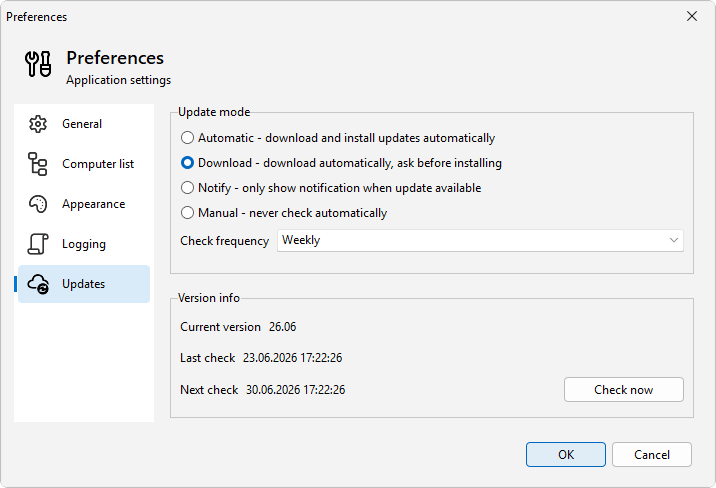
LanSend can look for new versions on its own and download them in the background. You decide how that works on the Updates page in Preferences, and you can run a check yourself whenever you want.
Check now
There are two ways to start a check by hand:
- Open Help > Check for updates.
- Open File > Preferences..., go to the Updates page, and click Check now.
The Updates page also shows Current version, Last check, and Next check, so you can see which build you are on and when the next automatic check is due.
Choose how updates are handled
On the Updates page, Update mode has four settings:
- Automatic - download and install updates automatically installs new versions without asking.
- Download - download automatically, ask before installing fetches the update in the background and prompts you before it installs. This is the default.
- Notify - only show notification when update available tells you a new version exists and leaves the download to you.
- Manual - never check automatically turns off the automatic check. Use Check now when you want to look.
Set how often LanSend checks
Check frequency controls the automatic check: On startup, Daily, Weekly, or Monthly. The default is Weekly. This setting has no effect in Manual mode, which never checks on its own.
Every download is verified for authenticity and integrity before it installs, so you can let the update run without inspecting the file yourself.