
The Presets menu
The Presets menu and the presets button (the menu icon next to the message body) both open your saved messages, grouped by category. The menu also holds the commands to import, export, manage, and reset your presets. Categories are new in 26.06.
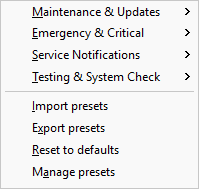
Load a preset
Open the Presets menu, or click the presets button in the composer, then pick a preset from its category. LanSend fills the title, body, and message type from the saved message, and leaves your recipients and send options as you set them. For the full walkthrough, see Using presets.
Menu commands
Below the categories, the Presets menu has four commands:
- Import presets adds presets from a file, so you can bring in a set from another machine.
- Export presets writes your presets to a file to share or keep as a backup.
- Reset to defaults restores the default categories and presets.
- Manage presets opens the category and preset tree, where you add, edit, move, or delete presets and categories. See Manage presets.
See also
Was this page helpful?
Thanks for your feedback.