
Session scope
A Windows PC can run several sessions at once: one person at the keyboard, others connected over Remote Desktop, plus sessions that are signed in but disconnected. The "Sessions:" dropdown on the send bar picks which of those receive your message. New in 26.06.
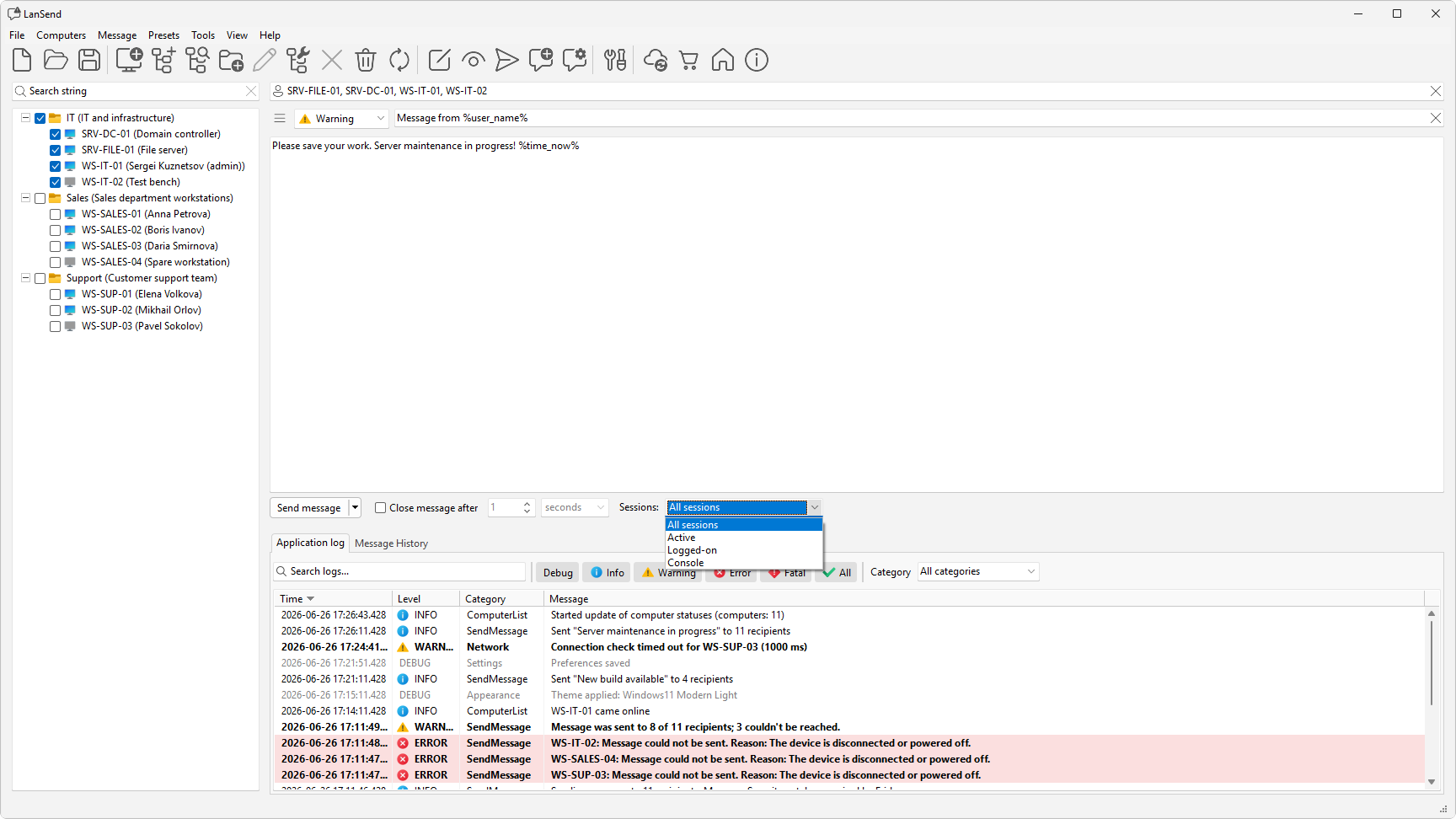
Pick a scope before you send
The "Sessions:" dropdown sits at the right-hand end of the send bar. Choose one of four options, then send. The same scope applies to every computer in the send.
- All sessions delivers to every session on the computer.
- Active reaches the session that is currently active or interactive, whether local or over Remote Desktop.
- Logged-on covers active sessions plus disconnected ones.
- Console delivers to the physical console session only.
When to use each
- Use Active for a quick note to whoever is using the machine right now. A disconnected session is skipped, but a locked session still counts as active.
- Use Logged-on when you want everyone who is signed in to see the message, including a person who connected over Remote Desktop and then disconnected without signing off. It is the broadest practical choice for reaching real people.
- Use Console to target the screen physically attached to the computer, ignoring any remote sessions.
- Use All sessions when the message should land in every session regardless of state.
The scope you pick here works the same way whether you send to one computer or to a whole group, so it pairs naturally with sending to many machines at once.
See also
Was this page helpful?
Thanks for your feedback.