
Add multiple computers
When you want to add a run of machines that share a naming scheme, Computers > Add multiple computers... lets you enter a name pattern that expands into many names at once. It is the quick way to seed a list. New in 26.06.
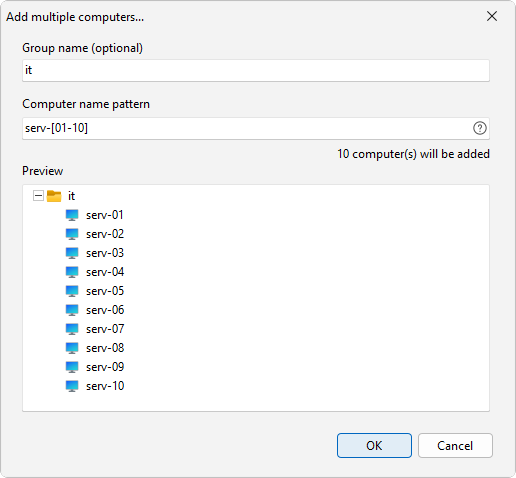
How to do it
- Select the group you want to fill, or create one first.
- Open Computers > Add multiple computers....
- In Computer name pattern, enter a name pattern that expands into multiple names, such as
server[01-10]. - Check the preview, which lists the names that will be added as you type.
- Set the group name if you want them in a different group.
- Confirm to add the names to the group.
Pattern examples
The pattern field expands into a list of names:
server[01-10]makes server01 through server10.[1-10:2]steps the numbers by 2, so 1, 3, 5, 7, and 9.{srv-a,srv-b}gives the exact names you list inside the braces.[A-Z]runs through a letter range.[A-C][1-3]combines parts, so A1, A2, A3, B1, and so on.
To add a specific set of names rather than a run, list them with the brace syntax, like {mars,venus,pluto}. There is no plain one-name-per-line box, so everything comes from the pattern and the preview shows exactly what will be added.
The names go into the group you picked, so you can keep one set of machines separate from another. To pull machines from a source instead of building names from a pattern, use Add computers from....
See also
Was this page helpful?
Thanks for your feedback.