
Introduction
LanSend is a LAN messenger for Windows. It sends a pop-up message to one computer or to many across your local network, with no server to set up and nothing installed on the computers that receive it.
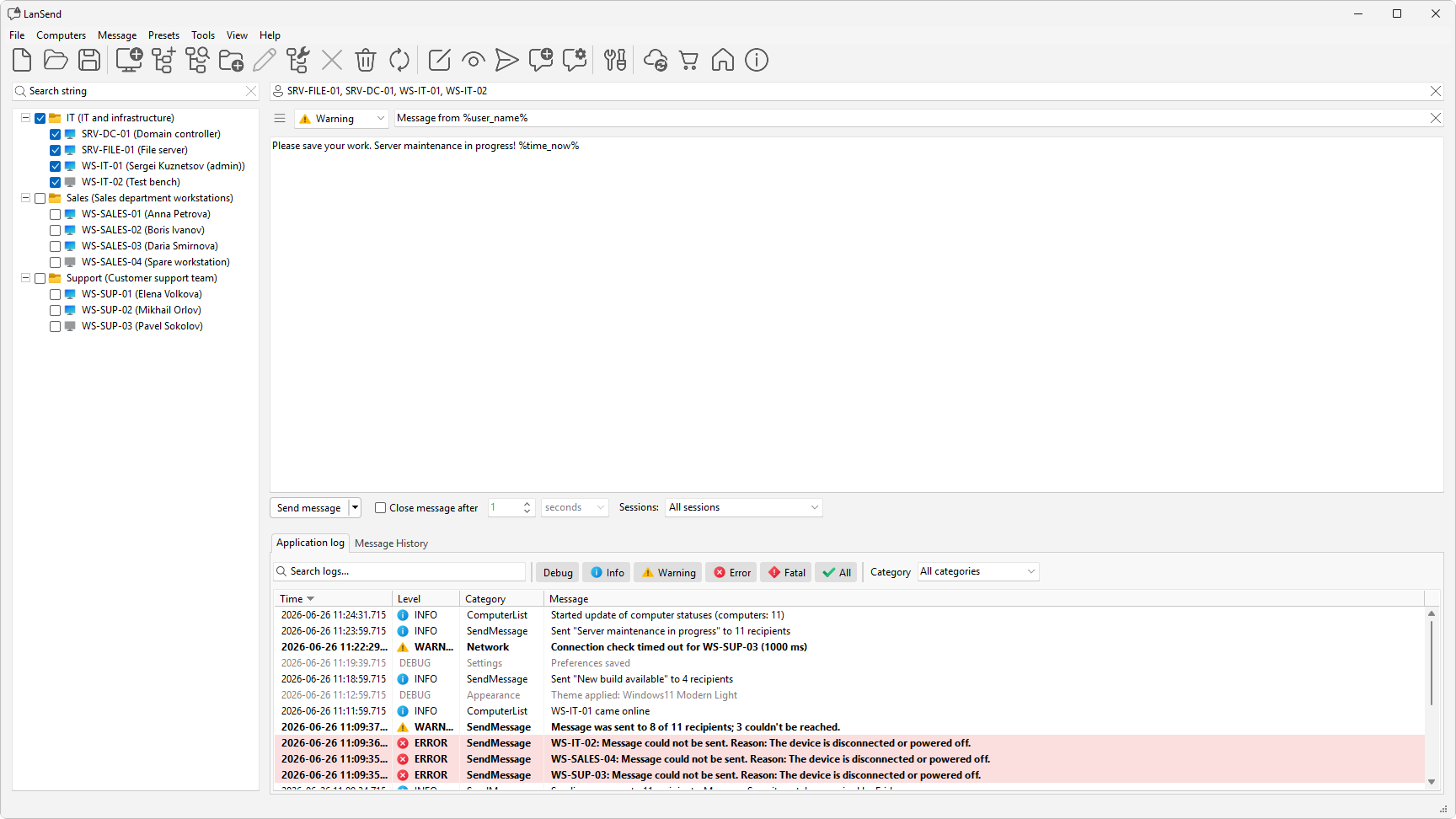
What LanSend does
LanSend shows a Windows message box to the people logged on to the computers you pick. It uses the Windows Terminal Services (WTS) messaging channel that comes with Windows, so there is no agent on the receiving computers and no central server. You need network access to each target computer and administrative rights on it.
This is the modern replacement for the old net send, which Microsoft removed after Windows XP. For a side-by-side look at the built-in tools, see net send and msg.exe alternative.
Who it is for
LanSend suits anyone who manages a group of Windows computers on one network: IT admins, helpdesk teams, computer labs, schools, and shop floors. Use it to warn a room before a server restart, tell a single user that their session is about to end, or post a maintenance notice across a lab.
What you can do
- Message one computer or broadcast to a whole group at once with the Send message button.
- Set the message type to None, Info, Warning, or Error, and give it a title.
- Choose which sessions receive it from the Sessions: dropdown: All sessions, Active, Logged-on, or Console.
- Reuse a saved preset to fill in a message you send often.
- Review what you have already sent on the Message History tab.