
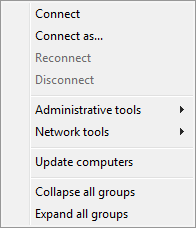
Computers menu
-
Connect – Connect to the remote computer selected in the computer list.
-
Connect as – Connect to the remote computer selected in the computer list with specified credentials.
-
ReConnect – reconnect to the remote computer.
-
Disconnect – Disconnect from the remote computer. After you execute this command, you will see processes running on the local computer in the process list.
-
Administrative Tools - adminstrative tools for managing remote computer
-
Network Tools - network tools for monitoring remote computer
-
Update computers – Update the state of computers in the computer list. The method selected in the preferences (ping, a connection to the specified port) is used to check the state.
-
Collapse all groups – Collapse all groups in the computer list.
-
Expand all groups – Expand all groups in the computer list.
Was this page helpful?
Thanks for your feedback.