
Bulk operations
When a list grows by import and discovery, it collects duplicates, stale entries, and inconsistent names. Computers > Bulk operations... reshapes the entire list in one pass, with a preview of exactly what will change before you commit.
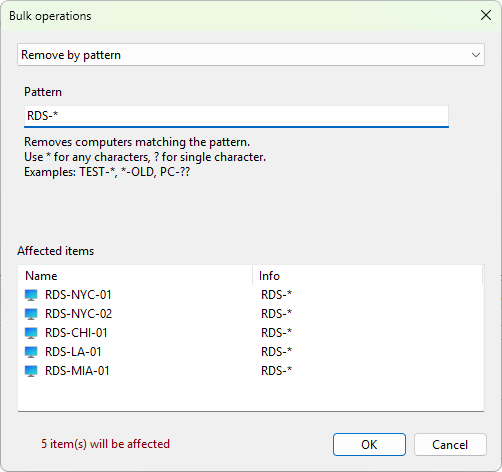
Pick an operation from the dropdown and the Affected items preview updates to show the result. The available operations are:
| Operation | What it does |
|---|---|
| Remove inactive computers | Drops servers that do not respond. |
| Remove duplicate computers | Keeps the first entry of each name and removes the rest (case-insensitive). |
| Remove empty groups | Deletes groups that hold no servers or subgroups. |
| Remove by pattern | Removes names matching a wildcard, such as TEST-* or *-OLD. |
| Flatten group structure | Moves every server to the root and removes all groups. |
| Normalize computer names | Converts names to one case style: UPPERCASE, lowercase, or Title Case. |
| Rename computers | Adds or removes a prefix or suffix, or replaces text across names. |
| Group computers | Builds groups automatically from a name prefix, an IP subnet, or a domain. |
| Format descriptions | Sets, clears, or rewrites the description field in bulk. |
Group computers is the fast way to impose structure on a freshly imported flat list: group by domain to split a mixed list by site, or by name prefix to gather each server role together. Rename computers and Normalize computer names fix the naming drift that builds up when several people add servers over time.
Bulk operations apply immediately and cannot be undone from inside the dialog. If you are not certain, export the list first so you can restore it. The list is only written to disk when you exit the program normally, so closing without saving also rolls a change back.
The handbook documents each operation in detail under bulk operations.