
Behavior
The General page covers small behavioural choices and the way numeric values are displayed.
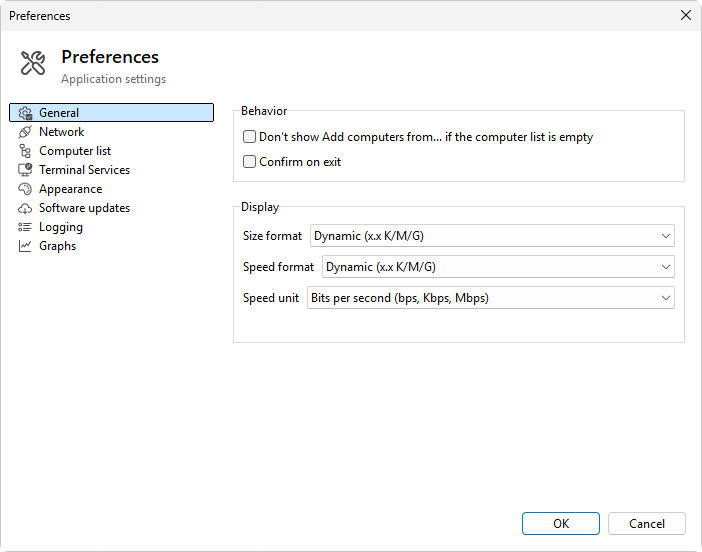
Startup and exit
- Don't show Add computers from... if the computer list is empty - tick to suppress the wizard that appears the first time the list is empty. Useful once you have built the computer list and do not want the wizard to nag.
- Confirm on exit - tick to ask "Are you sure?" when closing the program. Default on.
Display formats
These affect how sizes, speeds, and timestamps are rendered in columns, charts, tooltips, and exports.
- Size format - how byte sizes are displayed. Seven Dynamic presets pick the unit (K / M / G or up to T) and the number of decimals automatically: Dynamic (x.x K/M/G), Dynamic (x K/M/G), Dynamic (x.xx K/M/G), Dynamic (x.x K/M/G/T), Dynamic (x K/M/G/T), Dynamic (x.x K/M), and Dynamic (x K/M). Two fixed presets, Bytes and Kilobytes, always use that one unit. The default is Dynamic (x.x K/M/G) and works for most users.
- Speed format - the same nine presets as Size format (seven Dynamic plus Bytes and Kilobytes). The default is Dynamic (x.x K/M/G).
- Speed unit - Bits per second (default) or Bytes per second. Bits per second is the convention in some networking tools; bytes per second matches Task Manager.
Display-format changes affect formatting only; the underlying numbers do not change, and no recalculation is needed when you switch.
Was this page helpful?
Thanks for your feedback.