
IP range source
The IP range source walks a contiguous range of IPv4 addresses and reports the hosts that respond.
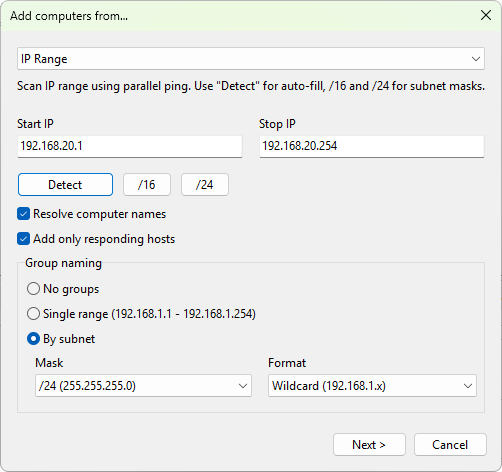
Range settings
- Start IP and Stop IP - the inclusive endpoints of the range. The start address must be a valid IPv4 address; both endpoints are validated before discovery starts.
- Detect - fills in the range using the IP address of the local network adapter.
- /24 - rounds the current range to a /24 subnet (256 addresses) based on the Start IP.
- /16 - rounds the current range to a /16 subnet (65,536 addresses) based on the Start IP. Use with care.
Discovery options
- Resolve computer names - do a reverse DNS lookup on each responding address so the list shows host names instead of bare IPs. On by default.
- Add only responding hosts - skip addresses that do not respond to ping. On by default; turn it off to add every address in the range regardless of response.
Group naming
The IP range source has its own grouping options that override what you choose on the final wizard page:
- No groups - add every discovered host at the top level.
- Single range - place everything in one folder named after the range (for example,
192.168.1.1 - 192.168.1.254). - By subnet - split the results into one folder per subnet. This is the default. Two extra controls become available:
- Mask -
/24 (255.255.255.0),/16 (255.255.0.0), or/8 (255.0.0.0). Default is/24. - Format - controls how each folder is named: Wildcard (
192.168.1.x) or CIDR (192.168.1.0/24).
Was this page helpful?
Thanks for your feedback.