
Adding a single computer
The Add computer dialog adds one machine to the list, or edits an entry that is already there.
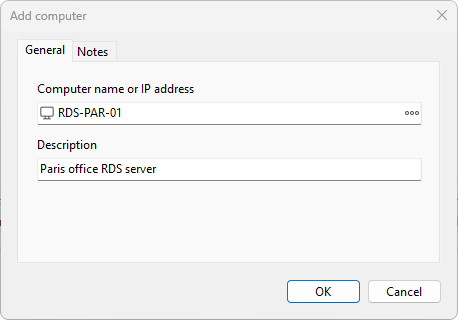
Opening the dialog
Choose Computers > Add computer... from the main menu, or right-click the computer list and pick Add computer.... The dialog title is Add computer for a new entry and Edit computer when you opened it on an existing one.
General tab
- Computer name or IP address - the host name, fully qualified DNS name, or IP address of the target. The ellipsis button on the right opens the Windows Select Computer dialog so you can pick a computer from your environment. The name cannot contain the characters
\ / : * ? " < > |. - Description - free-form text shown next to the name in the list. Use it for room numbers, owner names, or any reminder you find useful.
Notes tab
A multi-line text box for longer notes. Anything you type here is saved with the entry and travels with import and export.
Saving your changes
Click OK to add the entry to the list (or save your edits). Click Cancel to discard them. If the Computer name field is empty, OK stays disabled.
See also: Connection credentials, Organizing computers into groups.
Was this page helpful?
Thanks for your feedback.