
Configuring process columns
The Processes tab ships with 15 data columns plus the graph column. Use the column settings dialog to pick the ones you want.
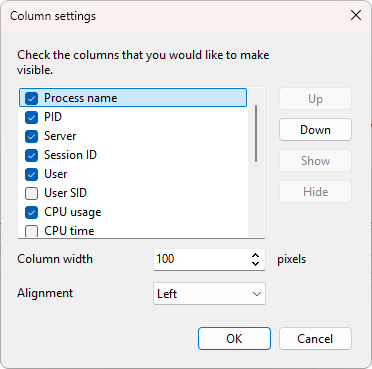
Opening the dialog
Right-click any column header on the Processes tab and choose Column settings....
What the dialog does
- List - one row per available column. The checkbox controls visibility. The order in the list is the order on the tab.
- Up / Down - reorder the selected column.
- Show / Hide - turn the selected column on or off.
- Column width - the width in pixels for the selected column.
- Alignment - left, right, or center alignment.
Changes apply to the tab as you make them.
The main column
The first column on the tab (the process name) cannot be hidden and cannot be moved out of first position.
OK and Cancel
OK keeps your changes. Cancel reverts to the layout that was in place when you opened the dialog. Layout changes are saved with the program's settings.
The same dialog is used for the Servers and User sessions tabs. Each tab has its own layout stored separately. The Application log tab has a fixed set of four columns (Time, Level, Category, Message) and does not use this dialog.
Was this page helpful?
Thanks for your feedback.