
WSUS source
The WSUS source reads client computers directly from the SUSDB database that Windows Server Update Services uses. Use it when WSUS holds your most accurate inventory of patched machines. Select it from the source list in the Add computers from wizard.
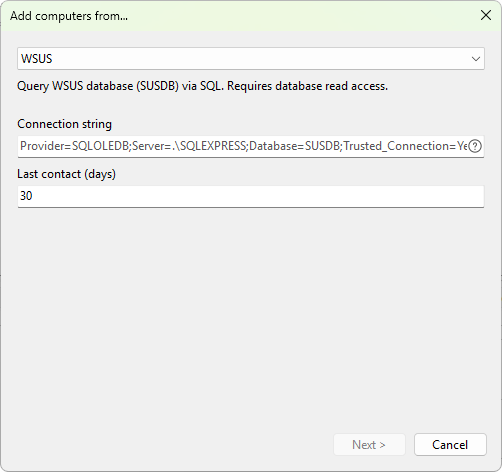
Settings
- Connection string - an OLE DB connection string that points to SUSDB. Any OLE DB provider for SQL Server works; the supported providers are
SQLOLEDB(the default),SQLNCLI11, andMSOLEDBSQL. The button on the right of the field shows a hint listing the supported parameters (Provider,Server,Database,Trusted_Connection,User ID,Password). - Last contact (days) - filter out clients that have not contacted the WSUS server within the given number of days. Default is
30; set to0to include every client regardless of last contact.
Sample connection strings
- Windows Internal Database (default install):
Provider=SQLOLEDB;Server=\\.\pipe\MICROSOFT##WID\tsql\query;Database=SUSDB;Trusted_Connection=Yes - SQL Server Express on the WSUS server:
Provider=SQLOLEDB;Server=.\SQLEXPRESS;Database=SUSDB;Trusted_Connection=Yes - Remote SQL Server with integrated authentication:
Provider=SQLOLEDB;Server=sqlserver.domain.local;Database=SUSDB;Trusted_Connection=Yes - Remote SQL Server with SQL authentication:
Provider=SQLOLEDB;Server=sqlserver.domain.local;Database=SUSDB;User ID=wsususer;Password=secret
Requirements
- The account used to connect must have read access to SUSDB (the built-in
WSUS Administratorsrole is sufficient). - The WSUS server (or the SQL Server hosting SUSDB) must be reachable from your management machine.
Was this page helpful?
Thanks for your feedback.