
Operators reference
The filter builder offers nine operators in total. Which ones appear in the operator combo depends on the type of the field you picked.
String operators
Available when the field is text (names, addresses, states).
- contains - the value is a substring of the field, case-insensitive. The most common choice.
- excludes - the value is not a substring. Useful for ignoring patterns (
process name excludes svchost). - begins with - the field starts with the value.
- ends with - the field ends with the value.
- equals - exact match, case-insensitive.
- not equals - any value other than the supplied one.
Wildcards are not interpreted. Type notepad to match notepad.exe, not notepad*.
Numeric operators
Available when the field is numeric (counts, percentages, sizes, speeds, times).
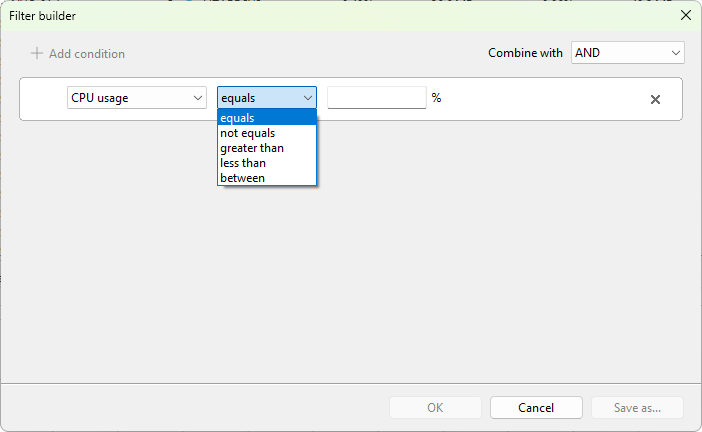
- equals - equal to the supplied value.
- not equals - any value other than the supplied one.
- greater than - greater than the supplied value.
- less than - less than the supplied value.
- between - inclusive range. The builder shows two value edits with
andbetween them. The lower bound goes first; if you reverse them the filter still matches the inclusive range.
Greater than or equal and less than or equal are not separate operators. To express >= 50, use greater than 49 for integers, or between with the same lower and upper bound.
Unit conversion
Numeric operators compare in a normalized unit:
- Sizes are normalized to KB.
- Speeds are normalized to B/s.
- Time is normalized to seconds.
- Percentages are kept as-is.
Picking a different unit in the builder's value edit (for example, Memory > 4 GB vs Memory > 4096 MB) does not change the match. The unit is only a display convenience.
Default operator per field
When you switch the field in the builder, the operator combo resets to a sensible default:
- String fields default to contains.
- Numeric fields default to greater than.
You can change to any compatible operator after picking the field.
Combining conditions
Operators apply to a single condition. The logical operator that combines all conditions (AND or OR) is set once for the whole filter, not per condition. See Building a filter for how to switch it.