
Registering your license
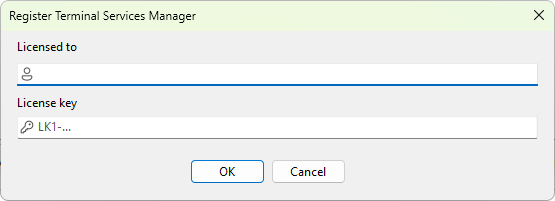
The Register Terminal Services Manager dialog accepts a license key and the name the license is issued to. Once entered correctly, the dialog closes and the program runs as registered from that point on.
How to open it
Choose Help > Enter registration code.... The dialog also opens when you click Enter license key in the unregistered-version reminder or the support-renewal prompt.
Fields
- Licensed to - the name the license is issued to. Use exactly what was on the license email; spelling and punctuation matter.
- License key - the license key itself. Keys for Terminal Services Manager begin with
LK1-TSM-and are followed by a long string of characters.
Both fields have a small icon on the left (user / key) and accept paste. Right-click for the standard text menu.
Buttons
- OK - validate the entered name and key, persist them if valid, and close the dialog. Enabled only when both fields contain text.
- Cancel - close without saving.
What happens on success
After a successful registration the Help > About... dialog shows the licensee name and the license type; the evaluation and support-renewal reminders stop appearing.
What happens on failure
If the key is malformed, expired, or does not match the name, the dialog stays open and the next attempt is rejected. Common reasons:
- A typo in either field. Copy and paste the values directly from the license email rather than retyping.
- The key was issued for a different product. Keys for other LizardSystems products carry a different product tag in the key body and are rejected here. Pick the key tagged for Terminal Services Manager (the
TSMsegment). - The key is older than the installed version's support window.
Storage
By default the license is stored under the Windows user who entered it; other users on the same machine do not see it. If the program was installed in system-wide mode (run with the /systemwideconfig switch), the license is shared across all users on the machine. Reinstalling or upgrading Terminal Services Manager preserves the stored license; uninstalling without removing application data also preserves it.