
User context menu
Right-click any row on the User sessions tab to open this menu. Every command operates on the selected sessions.
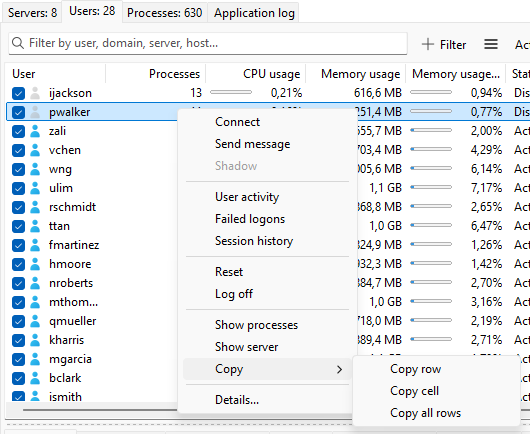
Connection
- Connect - start a Remote Desktop connection to the focused session's server using the focused session's user name. The program prompts for the user's password and launches
mstsc.exe. Use this for picking up a disconnected session as that user. - Disconnect - drop the connection, keep the session on the server.
- Send message - opens the send message dialog for the selected sessions.
- Shadow - opens the shadow dialog for the focused session.
Diagnostics
- User activity - opens the user-activity log filtered to this user (see Session history).
- Failed logons - opens the failed logons viewer filtered to this user.
- Session history - opens the full session history viewer for the user's server.
Session control
- Reset - terminate the session immediately.
- Log off - end the session.
Both commands ultimately call the Windows WTSLogoffSession API; the difference is the confirmation prompt and the recommended use (see Resetting a session).
Drill-down
- Show processes - switches to the Processes tab filtered to the focused session.
- Show server - switches to the Servers tab and selects the host.
Copy
- Copy row - the focused row.
- Copy cell - the cell under the mouse pointer.
- Copy all rows - every visible row with a header.
Was this page helpful?
Thanks for your feedback.