
Logging
The Logging page controls how much detail the program writes to its in-memory log (the Application log tab) and to the on-disk log file.
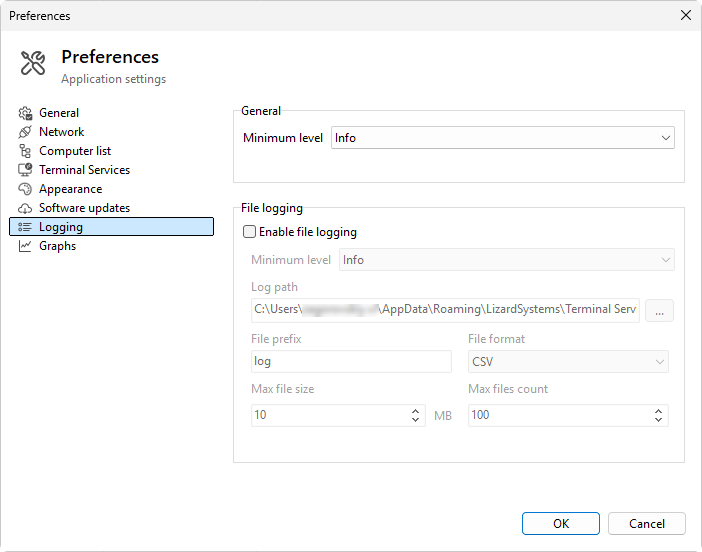
Minimum level (in memory)
- Minimum level - the lowest level kept in the in-memory log. Options: Debug, Info (default), Warning, Error, Fatal. Entries below the threshold are dropped before the in-memory writer ever sees them.
Set this to Debug when you need verbose tracing for support; revert to Info for normal use.
File logging
- Enable file logging - tick to write the log to disk as well as to the in-memory viewer.
- Minimum level - the lowest level written to the file. Can't be lower than the in-memory minimum level; entries already dropped from memory never reach the file. Defaults to Error.
- Log path - the directory the log files are written into. A browse button marked ... opens a folder picker.
- File prefix - the file-name prefix used for each log file. Files are named
<prefix>_<timestamp>.<ext>. - File format - CSV (default, comma-separated), Text (one entry per line), or JSON (one object per line, easy for log-analysis tools).
- Max file size - rotates to a new file when the current one reaches this size. Range 1 to 1000 MB; default 10 MB.
- Max files count - how many rotated files to keep. Older files are deleted to stay under the count. Range 1 to 100; default 10.
Validation
Saving fails if the log path or prefix is empty or the size / count fields are out of range. An error message names the offending field.
What happens when you change a setting
In-memory level changes apply immediately; the next entry uses the new threshold.
File-logging changes (enable / disable, level, format, path) apply on save: the current log file is closed, and a new one with the new settings is opened. The on-disk content from before the change is left intact.
Was this page helpful?
Thanks for your feedback.