
Adding multiple computers
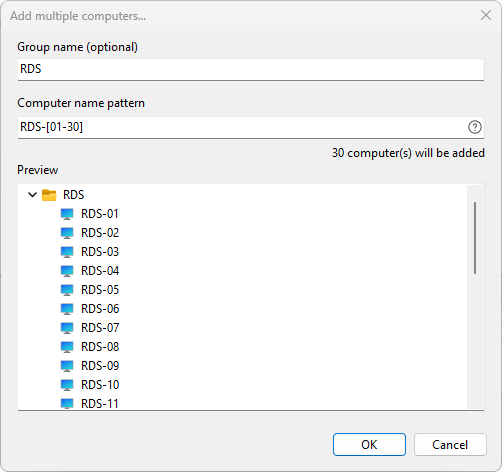
The Add multiple computers dialog generates a batch of computer entries from a single pattern. It is the fastest way to add a numbered fleet (PC-01 through PC-30), a labeled set (SRV-A, SRV-B, SRV-C), or a combination of both.
Opening the dialog
Choose Computers > Add multiple computers... from the main menu.
Pattern syntax
Type a pattern into the Computer name pattern field. The dialog supports the following expansion operators, which can be combined freely:
| Syntax | Expands to | Example | Result |
|---|---|---|---|
{a,b,c} |
each comma-separated value | srv-{web,db,app} |
srv-web, srv-db, srv-app |
[1-10] |
inclusive numeric range | pc-[1-3] |
pc-1, pc-2, pc-3 |
[01-10] |
numeric range with leading zeros | pc-[01-03] |
pc-01, pc-02, pc-03 |
[A-Z] |
inclusive alphabetic range | rack-[A-C] |
rack-A, rack-B, rack-C |
[aa-zz] |
multi-character alphabetic range | srv-[aa-ac] |
srv-aa, srv-ab, srv-ac |
[1-10:2] |
range with step | pc-[1-10:2] |
pc-1, pc-3, pc-5, pc-7, pc-9 |
Click the help button on the right of the field (or the right-side button on the editor) to open a dialog with the full list of supported patterns and worked examples.
Live preview
The tree below the pattern field updates as you type. It shows the names that will be created and the total count. Two safeguards apply:
- Only the first 1,000 names are shown in the preview; if the pattern generates more, the count below the preview reads "N computer(s) will be added (showing first 1000)".
- The dialog will not let you generate more than 10,000 entries in one operation.
If any generated name contains an invalid character, the preview shows the error and OK stays disabled until you fix the pattern.
Group name
Fill in Group name (optional) at the top of the dialog to place all generated entries inside a new folder of that name. Leave it blank to add them at the root level. The same validation rules that apply to a manually created group apply here.
Saving your changes
Click OK to write every generated entry to the computer list. Click Cancel to discard them.
See also: Adding a single computer, Adding computers using the wizard.