
RDS source
The RDS source (listed as RDS in the wizard's source dropdown) connects to a Remote Desktop Connection Broker and returns the session hosts registered with it. Use it to import every session host from an RDS deployment in one step. Pick RDS on the first page of the Add computers from wizard.
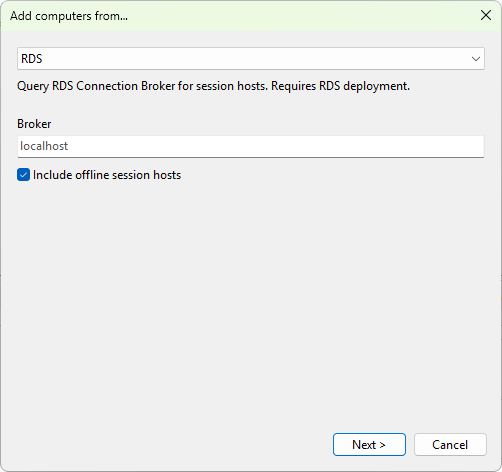
Settings
- Broker - the host name or FQDN of the RDS Connection Broker server. Leave blank to query the local machine.
- Include offline session hosts - when ticked (default), every host the broker knows about is returned, even ones currently unreachable. When unticked, hosts whose state is anything other than running are dropped from the result. On Windows Server 2016 and later this uses the
Win32_RDSHServer.ServerStateWMI property; on older brokers (Server 2012 / R2) that property is empty, and the source falls back to a short ICMP probe (500 ms timeout) for each host.
What it returns
The source enumerates RD Session Host servers known to the broker (via the Win32_RDSHServer WMI class). Discovered hosts appear as a flat list in the preview tree.
Requirements
- The machine that runs Terminal Services Manager must be able to reach the broker over WMI (the
root\cimv2\rdmsnamespace). - The account running the program must have permission to read deployment information from the broker.
- For the offline filter to work on older brokers, the management machine must be able to reach the session hosts with ICMP echo (allow File and Printer Sharing - Echo Request in the host firewall, or accept that hosts behind ICMP-blocking firewalls are reported as offline).
Was this page helpful?
Thanks for your feedback.