
Server state verification
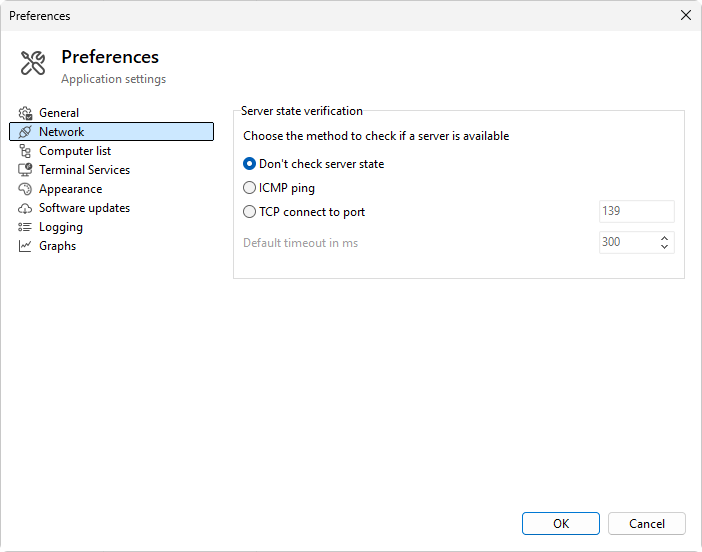
The Network page picks the method the program uses to decide whether a server is reachable. The choice affects the online / offline icon next to each entry in the computer list and the auto-update logic.
Method
Three radio options:
- Don't check server state - the program never probes; every entry is treated as reachable until an actual query fails. Use this when you do not want the icons to flap and you trust the network.
- ICMP ping - the program sends ICMP echo requests to the server. The same protocol
ping.exeuses. Fast and lightweight, but blocked by some firewalls. - TCP connect to port - the program opens a TCP connection to the chosen port. If the connect succeeds the server is considered reachable; if not, it is offline.
Port (TCP method only)
- Port - the TCP port to connect to. Range 1 to 65535, default 139 (NetBIOS Session Service). Common alternatives: 445 (SMB), 3389 (RDP), 80 (HTTP), 443 (HTTPS).
Timeout
- Default timeout in ms - how long the program waits for the ICMP echo reply or the TCP connect to succeed before declaring the server offline. Enabled only for ICMP ping and TCP connect. Defaults to 300 ms. Increase it on slower or higher-latency networks; decrease it for a snappier offline / online flip.
Validation
The dialog refuses to save with a port outside 1-65535 or a non-positive timeout. The offending field is reported in an error message.
Which to pick
- ICMP if the firewall lets it through and you want speed; most local networks allow ICMP from management hosts.
- TCP on a port the server already exposes (139 / 445 for RDS hosts, 3389 if RDP is allowed) when ICMP is blocked.
- Off when the icons are noisier than they are useful, or when probing causes alerts in your security monitoring.
Was this page helpful?
Thanks for your feedback.