
Enabling or disabling Remote Desktop
This dialog turns Remote Desktop Services on or off on the selected server. Use it to bring a freshly-built server into the program's coverage, or to lock down a server you no longer want reachable over RDP.
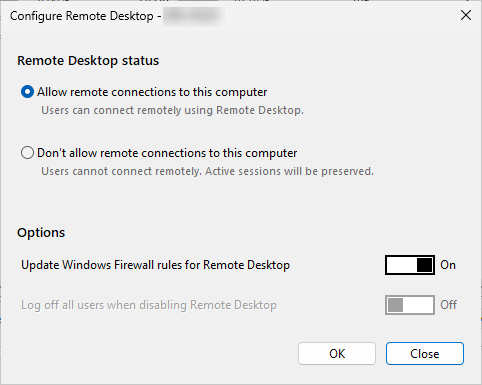
How to do it
Right-click the server on the Servers tab and choose Administration > Configure Remote Desktop.... The Configure Remote Desktop dialog opens with the server's current state loaded.
Options
Two radio buttons under Remote Desktop status set the target state:
- Allow remote connections to this computer - users can connect remotely using Remote Desktop.
- Don't allow remote connections to this computer - users cannot connect remotely. Active sessions are preserved unless you also turn on the log-off switch below.
Two toggle switches under Options modify the action:
- Update Windows Firewall rules for Remote Desktop - when on, the Remote Desktop firewall group is enabled or disabled to match the chosen state.
- Log off all users when disabling Remote Desktop - when on, every active session on the target is logged off after Remote Desktop is disabled, so nobody is left on a host that no longer accepts new connections.
What happens on the server
The action makes WMI calls against the target. It calls the SetAllowTSConnections method on Win32_TerminalServiceSetting, passing the chosen state and the firewall flag in one call, then logs off active sessions if that option is switched on. A small activity indicator and status label at the bottom report progress.
Errors are reported as Win32 reasons; the most common is Access denied when the connecting account lacks administrator rights on the target.